


There are three ways to withdraw money from Cash App: cash out to a linked bank account (free in 1 to 3 business days, or instantly for a fee), pull cash from an ATM with your Cash App Card ($2.50 fee, waived in-network with Green status), or take cash back at a store register with the card (usually free). Which one fits depends on whether you have a bank account linked, whether you hold the card, and how fast you need the money. Here is each route with its real fees and limits.
How do you cash out to your bank account?
This is the standard route. If your bank is not linked yet, add it first: Profile icon → Linked Banks → Link Bank, then pick your bank.
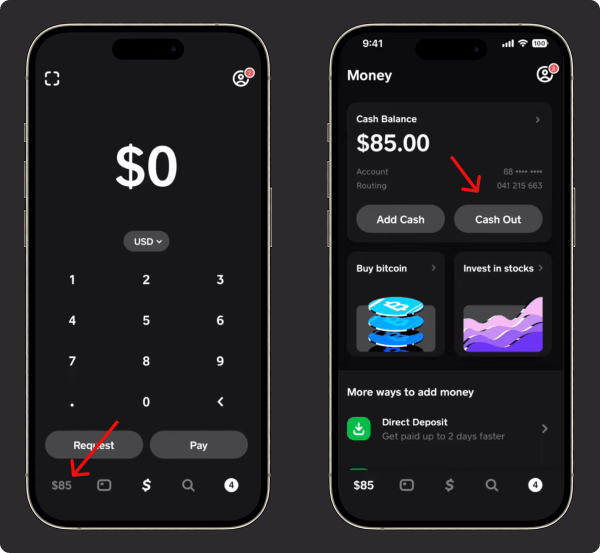
- Open Cash App and tap the Money tab.
- Tap Cash Out and enter the amount.
- Choose the speed: Standard is free and arrives in 1 to 3 business days. Instant costs 0.5% to 2.5% of the amount (minimum $0.25 to $1, maximum fee $75) per Cash App’s terms and lands in minutes.
- Confirm with your PIN, fingerprint, or Face ID.
Cash App publishes no fixed cap for a single cash-out; your own limits appear in the app, and the full picture is in our guide to Cash App limits. Full official steps: Cash App’s withdrawal instructions.
Can you withdraw money without a bank account?
Yes, three ways, though each has a catch:
- Instant cash-out to a linked debit card. Works without a bank account in the app; the instant-deposit fee above applies.
- The Cash App Card. Order the card, then use ATMs or register cash-back, covered in the two sections below.
- Send the balance to someone you trust who has a linked bank, and let them withdraw. Works, but you are trusting them with the money.
How do you withdraw at an ATM with the Cash App Card?
The Cash App Card is a Visa debit card tied to your balance. Activate it once, then use it at any ATM; activating a Cash App Card needs only the QR code from its envelope or the card’s CVV and expiry.

The real numbers:
- Fee: $2.50 per withdrawal from Cash App, plus whatever the ATM owner charges. The fee is waived at in-network ATMs if you have Green status (regular direct deposits).
- Limits: $1,000 per 24 hours AND $1,000 per rolling 7 days. Most current sources also put the per-transaction cap at $1,000, though older pages still say $310; the app shows your exact number. Identity verification does not raise ATM limits.
How does cash back at a store register work?
At checkout in stores like Walmart, Walgreens, or most grocery chains, pay with your Cash App Card as a debit transaction and ask for cash back. Enter your PIN, and the cashier hands you the cash with your purchase. Each store sets its own cash-back cap per transaction, and the amount counts against the same $1,000 daily and weekly withdrawal windows as ATMs.
This is usually the cheapest way to turn a balance into physical cash: most stores charge nothing for cash back, and there is no $2.50 ATM fee.
What are the withdrawal fees and limits?
| Route | Fee | Speed | Limit |
|---|---|---|---|
| Standard cash-out to bank | Free | 1 to 3 business days | No fixed published cap |
| Instant cash-out to bank or debit card | 0.5%–2.5% (min $0.25–$1, max $75) | Minutes | No fixed published cap |
| ATM with Cash App Card | $2.50 + ATM owner’s fee (waived in-network with Green) | Immediate | $1,000/24h and $1,000/7d |
| Cash back at a register | Usually free | Immediate | Store’s per-purchase cap, within the same $1,000 windows |
Every other Cash App fee follows the same pattern as cash-outs: free by default, paid only for speed or cash handling.
Your account’s exact numbers are in the app under Settings → Limits. For everything beyond withdrawals, see Cash App limits.
Key takeaways
- Free route: standard cash-out to your bank, 1 to 3 business days.
- Fast routes: instant cash-out (0.5% to 2.5%, max $75 fee), an ATM ($2.50, waived in-network with Green), or register cash back (usually free and immediate).
- ATM and cash-back withdrawals share the same caps: $1,000 per 24 hours and $1,000 per rolling 7 days.
- No bank account? Use a linked debit card, the Cash App Card, or a trusted person with a bank.
- Payments and transfers stay protected by PIN or biometrics at every step.
For moving money to other apps instead of cash, see transferring from Cash App to Venmo or to Chime.
For the full picture of what your account can do, see our guide to how Cash App works.





