


No, Cash App cannot send money directly to Venmo, but you can move the funds through a bank account or debit card linked to both apps. The free route takes 1 to 3 business days; the instant route costs 0.5% to 1.75% on Cash App’s side. Here are the three methods that work, the exact fees, and the limits that apply.
1. How do you transfer through a shared bank account?
The simplest method is linking both apps to the same bank account, then moving the money in two hops.
Step 1: Cash out from Cash App to your bank
- Open Cash App and select the Balance tab.
- Tap Cash Out and select your linked bank account.
- Choose Instant Transfer (0.5% to 1.75% fee, minimum $0.25) or Standard Transfer (free, 1 to 3 business days).
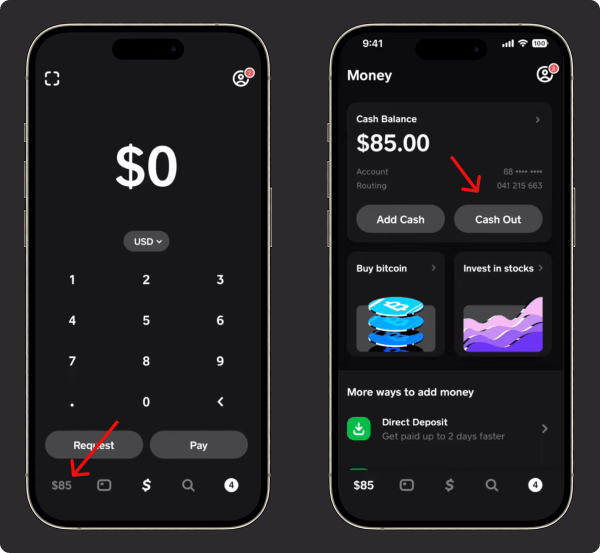
The full cash-out flow is covered in our guide to withdrawing money from Cash App.
Step 2: Add the money to Venmo
- Open Venmo and tap Add Money.
- Select the same bank account.
- Confirm and wait for the funds to appear.
2. How do you link the apps’ debit cards?
The two debit cards can each serve as a payment method in the other app, which skips the bank hop.
Using the Cash App Cash Card in Venmo
- Order a Cash Card if you do not have one, and activate it in Cash App.
- In Venmo, open payment methods and add the Cash Card as a debit card.
- Venmo payments now draw from your Cash App balance.
Using the Venmo Debit Card in Cash App
- Apply for the Venmo Debit Card if you do not have it.
- In Cash App, open payment methods and add the Venmo card.
3. How does the direct-deposit trick work?
Cash App can behave like a bank account inside Venmo, which removes the manual hops entirely.
- In Cash App’s banking section, select Get Account Number.
- Copy the routing and account numbers Cash App gives you.
- In Venmo, add those numbers under Payment Methods as a bank account.
Venmo now treats Cash App as a bank, so transfers flow like normal bank moves.
What are the fees and limits?
Fees
- Standard transfers: free on both apps, 1 to 3 business days.
- Cash App instant transfer: 0.5% to 1.75% per transaction, minimum $0.25.
- Venmo instant transfer: 1.75% per transaction, minimum $0.25, maximum $25.
Limits
- Cash App: unverified accounts send up to $250 per 7 days and receive up to $1,000 per 30 days; verified accounts send up to $7,500 per week. Every cap is in our guide to Cash App limits.
- Venmo: unverified accounts send up to $299.99 per week; verified accounts can send up to $60,000 a week in total, with person-to-person payments reported at $4,999.99 a week and card purchases capped at $3,000 a day, detailed in our guide to Venmo limits.
How do you keep the transfer secure?
- Enable two-factor authentication on both apps.
- Double-check linked payment methods before sending.
- Watch for phishing: neither app asks for account details by email or text.
Key takeaways
- No direct transfers exist between Cash App and Venmo.
- A shared bank account is the reliable route: free in 1 to 3 days, or instant for 0.5% to 1.75% on Cash App’s side.
- Either app’s debit card can act as a payment method in the other.
- The direct-deposit trick makes Venmo treat Cash App like a bank.
- Going the other way? See our guide to transferring money from Venmo to Cash App.
For the full picture of what your account can do, see our guide to how Cash App works.





