


Ordering a new Cash App Card takes a few taps in the app: your first card is free, a replacement costs $5, and the physical card arrives within about 10 business days. You can start spending immediately, because the new card’s details work in the app and in Apple Pay or Google Pay before the plastic shows up. Here is the full process, whether your card is lost, damaged, or just due for a new look.
When should you order a new Cash Card?
Three situations call for it: your card is lost or stolen (report it first so it deactivates immediately), it is physically damaged, or you simply want a new design. If the card is lost or stolen, speed matters more than anything else on this page, so start with the next section.
How do you report a lost or stolen Cash App Card?
- Open Cash App and tap the Card tab.
- Tap Get card support, then Report your card.
- Choose whether the card is missing or stolen, and follow the prompts.
- Confirm the deactivation.
Reporting cancels both your physical and virtual cards immediately and issues new ones with a new number, per Cash App’s card agreement, so nobody can spend on the old details from the moment you report.
How do you order a new Cash App Card?
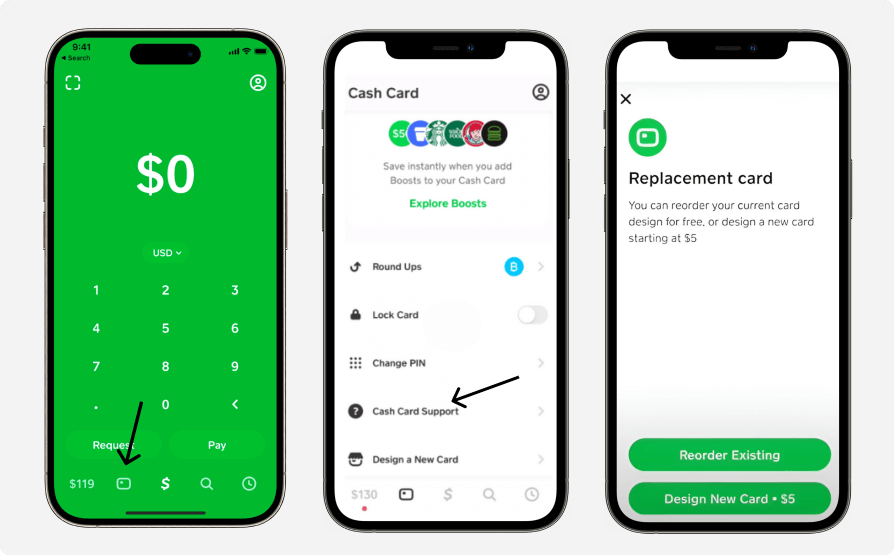
- Open the latest version of Cash App and log in.
- Tap the Card tab at the bottom.
- To replace a missing card, go through Get card support → Report your card; for a fresh design, choose Design a new card under the card management options.
- Pick your style. Free cards come in black or white; custom designs cost extra (below).
- Personalize if you want: text, drawings, or emojis.
- Confirm your mailing address and accept the card terms.
- Track it from the app; the card ships to arrive within 10 business days (about 14 days), and you get a notification when it ships (Cash App help).
You do not have to wait for the envelope: the new card’s number, expiry, and CVV appear in the app right away, and adding the card to Apple Pay or Google Pay lets you spend before the physical card arrives.
What does a new Cash App Card cost?
| Order type | Cost |
|---|---|
| First card (standard black or white) | Free |
| Replacement (standard) | $5.00 |
| Replacement (metal) | $50.00 |
| Custom design | From $5, varies by style; limited editions and metal run higher |
These are the official fee-schedule figures from the card agreement, current as of April 2026. Teens 13 to 17 can order a card too, on a sponsored account with a parent or guardian’s approval; see our guide to the Cash App family account.
How do you activate the new card?
Activating your Cash App Card takes under a minute, with the QR code from the envelope or the card’s CVV and expiration date.
If you replaced a damaged card (not lost or stolen), your old card keeps working until the moment the new one is activated, so there is no dead window.
Does a new card come with a new number?
If you reported the card lost or stolen: yes, always. Both cards are canceled and reissued with a new number for security. For a simple redesign, the plastic typically carries a new card number as well, while your Cash App account and routing numbers stay the same. Either way, update any subscriptions that bill the old card number.
What should you do if the card gives you trouble?
- Can’t activate: update the app, restart it, and retry; if it persists, contact support through the app.
- Forgot your PIN: tap your profile icon → Security & Privacy → Change Cash PIN. One PIN covers both the app and the card, so changing it changes both.
- Card declined abroad: the Cash Card works anywhere Visa is accepted, with a 3% foreign transaction fee (waived on card-present purchases if you hold Green status). There is no “travel notice” to file. If a foreign purchase declines, the cause is the fee-inclusive amount exceeding your balance, a merchant category block, or a security hold, not a missing travel flag.
For spending and ATM ceilings on the card, see our guide to Cash App limits.
How do you use the Cash Card in stores?
Swipe, insert, or tap it like any Visa debit card, choose Debit if the terminal asks, and enter your Cash PIN. The amount comes straight out of your Cash App balance; the card has no separate balance to load. If the paper money option is missing from your app while you’re at the register, our guide to getting the paper money option covers why.
Key takeaways
- First Cash App Card: free in black or white. Replacements: $5 standard, $50 metal. Custom designs: from $5, varies.
- Physical delivery takes about 10 business days, but the new card details work instantly in the app and in Apple Pay or Google Pay.
- Reporting a card lost or stolen cancels the virtual and physical cards at once and reissues a new number.
- One active Cash Card per account; a replaced card works until the new one is activated (unless reported lost or stolen).
- Your Cash PIN is one PIN for the app and the card, changed under Security & Privacy.
For everything else the card can do, see our guide to how Cash App works.





