


There is no direct Cash App to Chime transfer, but Chime is a bank, so the move is just a Cash App cash-out: link your Chime Checking account for a free transfer in 1 to 3 business days, or link your Chime Visa debit card for an instant transfer in minutes with Cash App’s 0.5% to 2.5% fee. Chime charges nothing on money coming in and sets no inbound limit. Here are both routes, the real fees and limits, and why the linking step sometimes fails.
Can you send money from Cash App to Chime?
Yes, in two ways, and both are ordinary Cash App cash-outs rather than a special Chime feature. Chime officially lists Cash App among the third-party apps it works with, and spells out the rule that matters: Chime Checking links as a bank account, the Chime debit card links as a card, and Chime Savings and Credit Builder cannot be linked to anything (Chime Help). Any fees on the transfer come from Cash App, not Chime.
Method 1: How do you transfer from Cash App to Chime for free?
Link Chime Checking as your bank, then use a standard cash-out.
Link the account:
- In Cash App, tap your profile icon → Linked Banks → Link Bank.
- Choose Chime from the list. Cash App links through Plaid, which signs you into Chime; Plaid requires an activated physical Chime card, so activate yours first if it is new.
- If Plaid fails, add the account manually with your Chime routing and account numbers (Chime app → Settings → Account details; the routing number is The Bancorp Bank’s or Stride Bank’s depending on which issued your account). Cash App then sends two small test deposits over 1 to 2 business days that you confirm in Cash App.

Cash out:
- Tap the Money tab → Cash Out, enter the amount, choose Standard.
- Confirm with your PIN or Touch ID.
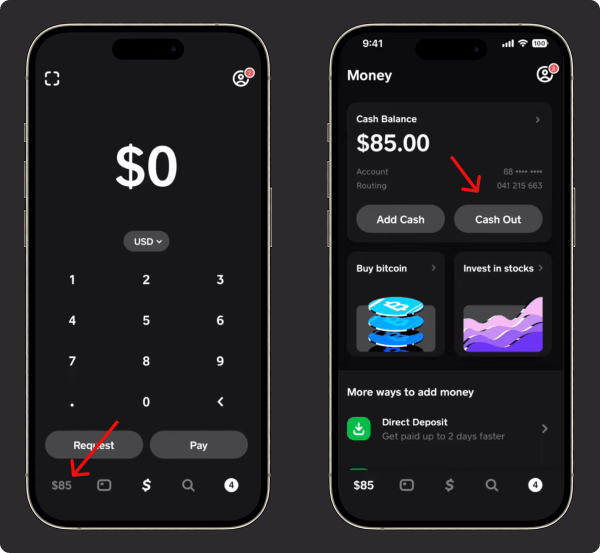
Standard cash-outs are free and land in Chime in 1 to 3 business days; they move over ACH, so weekends and bank holidays do not count. Each Cash App account can hold one linked bank and up to two debit cards at a time (Cash App help).
Method 2: How do you transfer from Cash App to Chime instantly?
Link your Chime Visa debit card instead of (or as well as) the checking account, then choose Instant.
- Profile icon → Linked Banks → Link Debit Card, enter the Chime card details.
- Money tab → Cash Out → amount → Instant → pick the Chime card.
The money typically posts to Chime within minutes (Cash App says up to 30 minutes in rare cases) because instant cash-outs ride the card networks’ push-payment rails, not ACH. The fee is Cash App’s: 0.5% to 2.5% of the amount, minimum $0.25 to $1, maximum $75, shown on screen before you confirm (Cash App terms). Chime confirms instant withdrawal to a Chime debit card is supported and adds no fee of its own.
What are the fees and limits?
| Route | Cost | Speed | Limit that applies |
|---|---|---|---|
| Standard cash-out to Chime Checking | Free | 1 to 3 business days | Cash App cash-out limits on your account |
| Instant cash-out to Chime debit card | 0.5% to 2.5%, min $0.25 to $1, max $75 | Minutes, up to ~30 | No published per-transfer cap for instant cash-out |
| Chime side, inbound | $0 | Posts when received | No inbound limit for transfers started from another platform |
Cash App’s account limits are the ones in our guide to Cash App limits: verified accounts send $7,500 per week and receive without limit; unverified accounts send $250 per 7 days and receive $1,000 per 30 days. Chime states it does not limit transfers initiated from an external platform, so the sending app’s limits are the only ones in play (Chime Help). Do not confuse the $25,000-per-deposit figure you may see elsewhere: that is Cash App’s inbound direct-deposit cap, not a cash-out limit.
How do you transfer from Chime to Cash App?
The reverse is an Add Cash in Cash App funded by your linked Chime account or card: Money tab → Add Cash → amount → choose Chime → confirm. Chime debits the money immediately, and Cash App usually credits it instantly from a debit card. Add-cash limits vary by account and show on Cash App’s Limits screen. Chime’s own Pay Anyone feature sends money to people, not into a Cash App balance, so it is not a route for this.
Why won’t Cash App link to Chime?
- Plaid login fails: the most common cause is an unactivated Chime card. Activate it in the Chime app, then retry, or fall back to manual routing and account numbers.
- “Account not supported”: you are trying to link Chime Savings or Credit Builder. Only Chime Checking links.
- Card declined on instant cash-out: the name on the Chime card must match your Cash App name; if the issuer cannot accept a fast push, Cash App downgrades to standard and refunds the fee.
- Transfer stuck: standard transfers started after bank cut-off or on a weekend land on the next business day; an instant transfer still pending past 30 minutes is a support case in Cash App.
- Duplicate instant charge: one is a pending authorization that drops off; if both post, contact Cash App support.
Your Chime balance is FDIC-insured up to $250,000 through The Bancorp Bank, N.A. or Stride Bank, N.A., so the money is safer sitting in Chime than in a payment-app balance.
Key takeaways
- No direct Cash App to Chime feature exists; it is a standard Cash App cash-out to a linked Chime Checking account (free, 1 to 3 business days) or Chime debit card (minutes, 0.5% to 2.5%, max $75).
- Chime charges nothing inbound and sets no inbound limit; every fee and cap on this route is Cash App’s.
- Link Chime Checking through Plaid (activated card required) or by routing and account number with test deposits. Savings and Credit Builder cannot be linked.
- Cash App: $7,500 per week verified sending, 1 linked bank plus 2 debit cards.
- Zelle and wires are not options: Cash App has no Zelle, and Chime takes no inbound wires.
For the other direction with Venmo, see whether Venmo works with Chime, and for every Cash App cash-out route, withdraw money from Cash App.
For the full picture of what your account can do, see our guide to how Cash App works.





