To send money on Venmo, open the app, tap Pay/Request, choose your recipient, enter an amount and a note, then tap Pay. The money lands in their Venmo balance right away, and sending from your balance, bank, or debit card is free. Here’s the full step-by-step, plus fees, timing, the personal-versus-purchase setting, and how to send without a bank account.
How do you send money on Venmo?
You send a payment in six steps:
- Open Venmo and tap the Pay/Request button.
- Choose your recipient by username, phone number, or email, or scan their QR code.
- Enter the amount.
- Add a note (an emoji is fine).
- Check the funding source shown, then tap Pay.
- Confirm the payment.
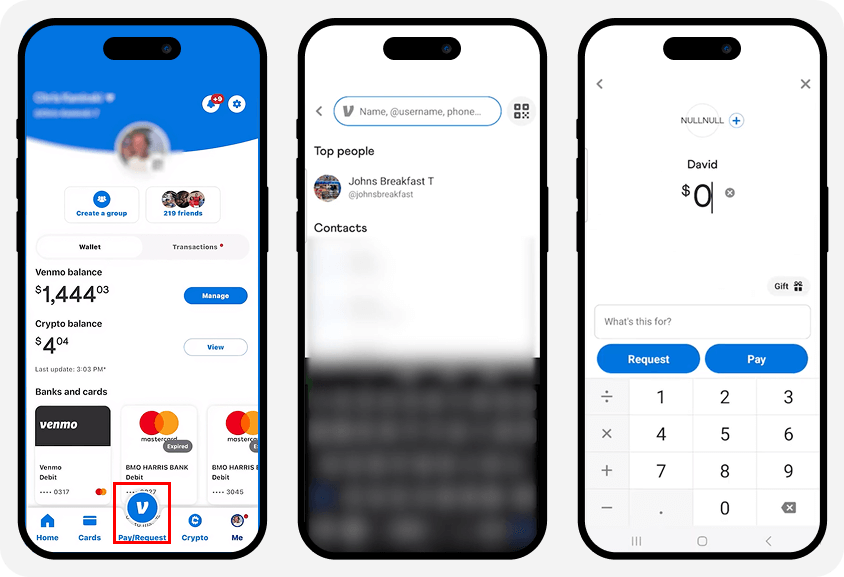
To build your contacts first, see our guide to adding friends on Venmo. For how the app works overall, start with how Venmo works.
Which account does Venmo pay from?
Venmo pays from your Venmo balance first. If your balance doesn’t cover the full amount, it pulls the rest from your linked debit card, credit card, or bank account. You can also pay yourself by linking two sources, which we cover in can you Venmo yourself.
How do you request money on Venmo?
You request money the same way you send it. Tap Pay/Request, pick the person, enter the amount and a note, then tap Request instead of Pay. They get a notification and can pay you in one tap. To split a bill, send one request to several friends at once.
How do you receive money on Venmo?
Money people send you lands automatically in your Venmo balance, and you get a notification. It’s free to receive a personal payment. From there you can spend it, send it on, or cash it out. For the full walkthrough, see receiving money on Venmo, and you can automate repeat payments with Venmo recurring payments.
How long does a Venmo payment take?
Person-to-person payments are instant: the money appears in the recipient’s Venmo balance right away. Moving money to a bank account takes longer. A standard transfer takes 1 to 3 business days and is free; an instant transfer reaches an eligible bank or debit card in minutes for a 1.75% fee.
What’s the difference between a personal and a goods-and-services payment?
A personal payment is for paying friends and is free; a goods-and-services payment is for buying from a seller and adds Purchase Protection. Venmo has no account-wide setting, so you choose per payment: to keep a payment personal, leave the goods-and-services toggle off (the shield icon should be grey, not green). Only tag a payment as goods and services when you’re buying something and want buyer protection.
What does it cost to send money on Venmo?
Sending money to people is free from most sources. Fees apply only in specific cases:
| Action | Fee |
|---|---|
| Personal payment from balance, bank, or debit card | Free |
| Personal payment from a credit card | 3% |
| Receiving a personal payment | Free |
| Standard transfer to your bank | Free (1–3 business days) |
| Instant transfer to your bank | 1.75% (min $0.25, max $25) |
| Goods-and-services payment | Seller pays 2.99%, deducted from the amount received |
So a normal payment from your balance or debit card costs nothing; the common fee is the 3% credit-card charge. The full schedule is on Venmo’s fees page, and our guide to Venmo limits and fees breaks it down further.
Can you send money on Venmo without a bank account?
Yes. You don’t need a bank account to send money, because Venmo can pull from your Venmo balance, a debit or credit card, or a linked prepaid card. To keep a balance without a bank, you can set up direct deposit or get the Venmo debit card to spend and withdraw. You just need a linked bank account to cash a balance out to a bank.
Can you send money to someone without Venmo, or abroad?
Venmo only works inside the United States, so you can’t send money to another country with it. You also can’t pay someone who isn’t on Venmo as a personal payment; they need to create a Venmo account to receive it. For international transfers, use a dedicated cross-border service.
Can you cancel a Venmo payment?
Usually no. A completed Venmo payment to another user is instant and can’t be canceled. If you paid the wrong person, you can ask them to send it back, but Venmo won’t force a refund. Pending payments to someone who hasn’t joined Venmo yet can be canceled before they’re claimed. Always check the username before you tap Pay. If your balance is stuck, see getting money out of a frozen Venmo account.
Is it safe to send money on Venmo?
Sending money on Venmo is safe when you pay people you know. The app encrypts payments and lets you lock it with a PIN or Face ID, and Venmo documents the flow in its sending and requesting money guide. Two cautions: personal payments are instant and hard to reverse, so only send to people you trust and watch for scams; and to keep your activity private, set payments to private, which we cover in sending money anonymously on Venmo. You can also block someone on Venmo if needed.
Key takeaways
- Send money with Pay/Request → recipient → amount → note → Pay → confirm; it’s instant.
- Venmo pays from your balance first, then your linked card or bank.
- Personal payments from balance, bank, or debit are free; a credit card costs 3%.
- Keep payments personal by leaving the goods-and-services toggle off.
- Payments are instant and hard to reverse, and Venmo is US-only, so confirm the recipient first.