


Receiving money on Venmo requires nothing from you: when someone sends a payment, it lands in your Venmo balance automatically, with no accept button and no receiving limit. All you provide is a way for the sender to find you: your username, phone number, email, QR code, or a payment request. The real questions sit on your side of the transaction: where the money goes, what an unverified account can do with it, and how to move it to your bank. Here is each one.
How do people send you money on Venmo?
There are four ways to get paid, and they all end the same way, with the money in your balance:
- Username. Share your @username and the sender picks you from search. Check the profile picture matches before confirming, and ask the sender to do the same.
- Phone number or email. Works even mid-conversation; the sender types it into the To field. If the number or email is not attached to your Venmo account yet, the payment waits for you (see the pending section below).
- QR code. In the app, tap the QR icon at the top of the Me tab and let the sender scan it, or send them the saved image. In person this is the misdirection-proof option. Our guide to printing your Venmo QR code covers using it on invoices and signs.
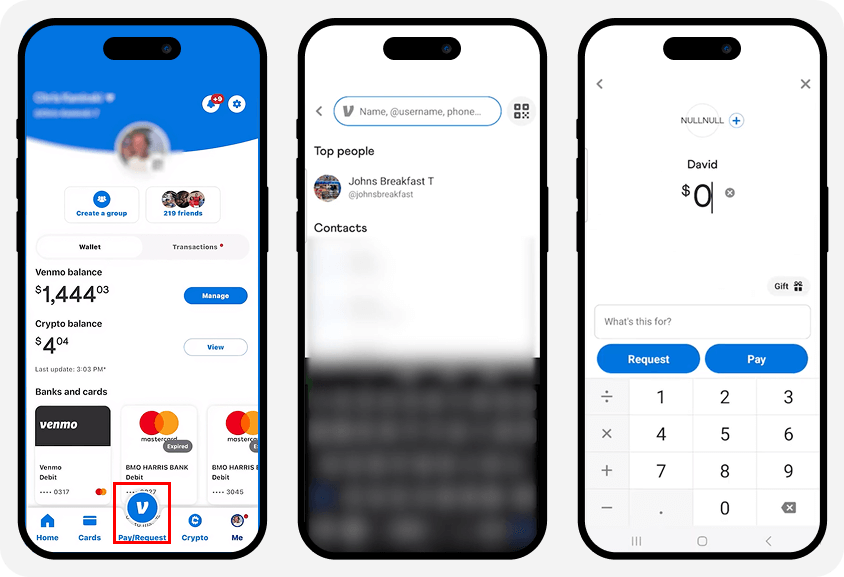
- Payment request. Tap Pay or Request, enter the person and amount, add a note, and send the request. They approve it and the money arrives. For money you collect on a schedule, see Venmo recurring payments.
Is there a limit on how much you can receive?
No. Venmo publishes no receiving limit for personal accounts. The figures you may see elsewhere are real Venmo numbers attached to the wrong action: “$19,999.99 per week” is the verified bank transfer cap (money OUT to your bank), and “$299.99 per week” is the unverified sending limit (money you pay to others). Neither caps what you can receive.
What actually constrains you as a receiver is getting money out: unverified accounts can transfer only $999.99 per week to a bank, verified accounts $19,999.99 per week with a $5,000 cap per individual transfer. A very large incoming payment can trigger a compliance review, but that is a security check, not a limit. The full picture of every cap is in our guide to Venmo limits.
Can you receive money without verifying your identity?
Yes, with one real restriction. Venmo’s official rule: an unverified account can still receive payments and transfer the money to a bank, but you cannot spend the balance on Venmo until you verify your identity. Verification is federal banking law, not a Venmo preference, and it also becomes required once you send $300+ in a week, transfer $1,000+ in a week to your bank, or receive a goods-and-services payment.
Verification takes a few minutes in Settings with your legal name, date of birth, address, and SSN. Once done, the balance unlocks for payments and your limits rise.
Where does the money go, and how do you use it?
Received money sits in your Venmo balance. From there, you have three options: spend it on payments to other people (verified accounts), spend it in stores with the Venmo Debit Card, or transfer it to your bank. The balance earns nothing, so money you do not plan to spend on Venmo belongs in your bank account.
What if the payment shows as pending?
Only two things cause a pending personal payment, per Venmo’s help center:
- The sender funded it from a bank account and the bank is still processing, which takes 3 to 5 business days.
- It was sent to a phone number or email not attached to a Venmo account. The payment waits 30 days for that contact to join and verify; if nobody claims it, it expires and returns to the sender, who can also take it back early.
There is no hold tier for large amounts or new accounts. If money seems stuck for another reason, the account may be under review; our guide to frozen Venmo accounts covers that path.
Do you pay fees or taxes when receiving money?
Personal payments are free to receive, whatever the sender’s funding source; sender-side fees (like the 3% credit-card charge) never touch the receiver. One exception: if the sender tags the payment as for goods and services, Venmo deducts a 2.99% seller fee from what you receive, per Venmo’s fee schedule, and the payment gains Purchase Protection for both sides.
On taxes: money from friends and family, including gifts, split bills, and loan repayments, is not income and generates no tax form. The IRS 1099-K applies only to goods-and-services payments, and the federal threshold for 2025 and 2026 is $20,000 AND more than 200 transactions. Some states report lower (Massachusetts, Virginia, Vermont, and Maryland at $600; Illinois at $1,000), listed on Venmo’s tax page. Income is taxable whether or not a form arrives; the form is just paperwork.
How do you avoid receiving-side scams?
Getting paid has its own scam patterns, and they all exploit one fact: Venmo payments to active accounts cannot be reversed by the sender.
- The “accidental” payment. A stranger sends you money, then messages begging you to send it back. The original payment came from a stolen card or account; when it is reversed by the bank, you have lost the amount you “returned.” Never send it back yourself. Contact Venmo support and let them reverse it.
- The overpayment. A buyer “accidentally” pays more than the price and asks for the difference back. Same mechanics, same fix.
- Unknown senders generally. Money from someone you do not recognize is a red flag, not a windfall. Report it, and block the sender if they pressure you.
How do you transfer received money to your bank?
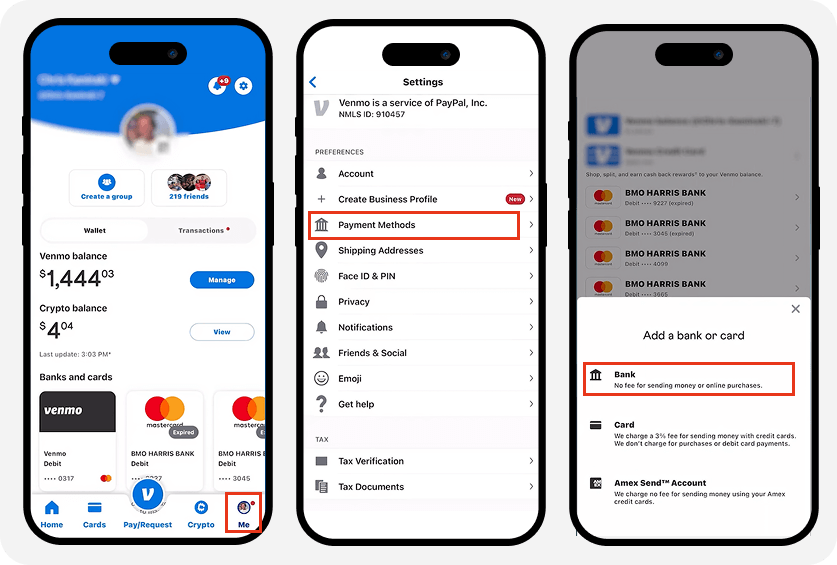
First link the account: Me tab → Settings → Payment Methods → Add bank or card. Verification happens instantly through your bank login or in 2 to 3 days with micro-deposits.
Then cash out: tap your balance, choose Transfer, enter the amount, and pick the speed. Standard is free and takes 1 to 3 business days to a bank (about 48 hours to an eligible debit card). Instant costs 1.75% (minimum $0.25, maximum $25) and typically lands within 30 minutes, capped at $5,000 per transfer.
Can teens receive money on Venmo?
Yes. A Venmo teen account (ages 13 to 17, opened and sponsored by a parent) has its own balance and debit card and can receive personal payments. The sponsor sees the activity and controls the account. Teen accounts cannot receive goods-and-services payments, so they are for allowances and family money, not selling.
Key takeaways
- Receiving is automatic: no accept step, no receiving limit. The sender just needs your username, phone, email, or QR code.
- The “receiving limits” published around the web are Venmo’s bank-transfer and sending caps with the wrong label.
- Unverified accounts can receive and cash out, but cannot spend the balance on Venmo until verified.
- Receiving personal payments is free; goods-and-services payments cost the receiver 2.99% and gain Purchase Protection.
- Money from friends is never taxable income; the 1099-K only covers goods-and-services past $20,000 and 200 transactions federally.
For everything else the app does, see our guide to how Venmo works.





