

The difference comes down to fees and tax. A personal account is free for everyday payments between friends and family. A business account charges 2.75% on every payment you receive, and in exchange it lets you accept unlimited customer payments and reports your earnings to the IRS. If you sell anything, Cash App expects you to use a business account.
Both account types share the same app, the same $cashtag, and the same Cash App Card. What changes is the cost of receiving money, the paperwork at tax time, the ceilings on what you can move, and how easily you can switch back. Each of those sits below, along with the single question that settles the choice for most people.
What is the difference between a Cash App personal and business account?
A personal account is built for paying people you know, and a business account is built for getting paid by customers. Everything else follows from that one distinction:
| Feature | Personal account | Business account |
|---|---|---|
| Fee on payments you receive | Free | 2.75% per payment |
| Intended for | Friends and family | Customers and clients |
| Receiving limit once verified | Unlimited | Unlimited |
| IRS tax form | None | 1099-K when you pass the threshold |
| Public profile | Name and $cashtag | Business name and $cashtag |
| Cash App Card | Yes | Yes |
Both run inside the same login, so the app itself looks nearly identical. For the underlying mechanics that apply to both, see how Cash App works.
What does a Cash App business account cost?
A business account costs 2.75% of every payment you receive, deducted automatically before the money reaches your balance. On a $100 customer payment you keep $97.25. There is no monthly charge and no setup fee, so the 2.75% is the entire cost of accepting payments.
Other fees are the same on both account types. Cashing out to your bank is free on the standard one to three day transfer, and an instant transfer costs 0.5% to 1.75% with a $0.25 minimum, per Cash App’s fee overview. Full withdrawal routes are covered in withdrawing money from Cash App.
What are the limits on each account type?
Verification, not account type, sets most of your ceilings. An unverified account of either kind is capped tightly, and verifying with your name, date of birth, and SSN lifts sending to $7,500 a week with unlimited receiving. The full breakdown of sending, receiving, card, and ATM caps sits in our guide to Cash App limits, and the business-specific figures are in Cash App business account limits.
Which account do you need?
Ask one question: are people paying you for goods or services? If yes, you need a business account, and using a personal one for sales breaks Cash App’s terms and risks the account being frozen. If the money is splitting dinner, rent, or gifts between people you know, a personal account is correct and free.
The grey area is the occasional sale. Selling a used bike once does not make you a business, but taking regular payments from strangers does, even as a side hustle. When receipts become regular, switch.
How do you switch between a personal and business account?
You switch inside the app rather than opening anything new:
- Tap your profile icon, then open Account & Settings.
- Select Personal.
- Tap Change Account Type.
- Confirm the switch to a business account.
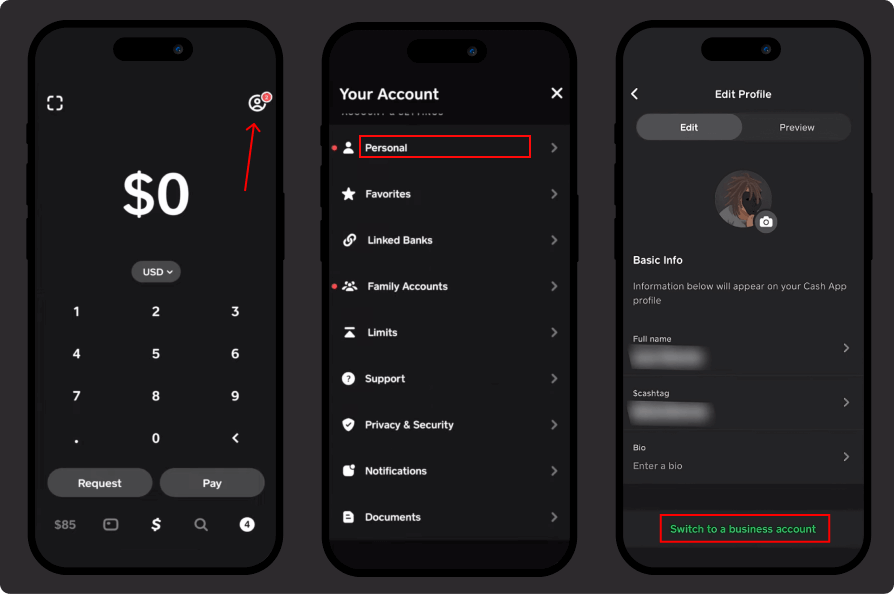
Your balance, $cashtag, and transaction history carry across, and the change is reversible. Step-by-step detail lives in changing your account type on Cash App, with the full setup path in setting up a Cash App business account. If you decide it was the wrong move, see closing a Cash App business account.
How does tax reporting work on a business account?
A business account reports your receipts to the IRS, and Cash App issues a 1099-K once your commercial payments pass the reporting threshold for the tax year. Personal accounts send no tax form, because payments between friends are not income.
That reporting is the real reason to classify correctly rather than a penalty for going business. Money you receive for sales is taxable whichever account collects it; a business account simply documents it. Because IRS thresholds have shifted repeatedly in recent years, confirm the current figure before you file, and see Cash App tax reporting for what the form covers.
Can you have both a personal and a business account?
Yes, and separating them is the cleaner setup. Cash App allows a second account provided each has its own email address or phone number, which lets you keep personal payments free while your sales run through the business profile. The requirements are covered in running two Cash App accounts, and a fresh signup is walked through in creating a new Cash App account.
What are the drawbacks of a business account?
Three trade-offs are worth knowing before you switch. The 2.75% fee applies to every incoming payment, including from friends who pay you by habit rather than for a product. Your business name becomes public on payments, so choose it deliberately. And tax paperwork arrives, which is only a burden if you were not tracking income anyway.
None of these outweigh the risk of taking sales through a personal account, which can end in a frozen balance while support reviews it.
Key takeaways
- Personal is free; business costs 2.75% of every payment received.
- Selling goods or services means you need a business account under Cash App’s terms.
- Verification, not account type, sets your sending and receiving limits.
- Business accounts get a 1099-K once receipts pass the IRS threshold.
- You can switch either way in the app, or run one of each with separate contact details.





