


Cash App’s paper money option lets you deposit $5 to $500 in physical cash into your balance at partner stores like Walmart, Walgreens, and 7-Eleven, for a flat $1 fee per deposit. The feature only appears on verified accounts, which is why many people cannot find it. Here is how to get the option, how a deposit works at the register, and the real limits.
What is the paper money option on Cash App?
The paper money option turns partner store registers into deposit points for your Cash App balance. You show a barcode from the app, hand the cashier your cash, and the money lands in your balance within minutes.
Each deposit costs a flat $1 processing fee, deducted from the amount you hand over, so a $100 deposit credits $99. Cash App waives the fee if you have Green status (roughly $300+ in monthly deposits or $500+ in monthly Cash App Card spending), and some retailers add their own small fee on top. Deposits are one-way: the feature adds cash and never dispenses it.
Why don’t you have the paper money option?
The most common reason is verification. Paper money is a verified-account feature, so if you have not confirmed your identity, the option will not appear. Our guide to using Cash App without an SSN covers exactly what stays locked on unverified accounts. Beyond that:
- Your app is outdated. Features ship through updates; install the latest version.
- The rollout has not reached you. Cash App enables features account by account, so an updated app can still lack the option.
- No partner stores nearby. The feature depends on retail partnerships, which vary by area.
How do you get the paper money option?
There is no application form; the honest path has three steps:
- Verify your identity in the app (full name, date of birth, SSN last four). This is the gate most missing-feature cases fail.
- Update the app, then check the Money tab for Paper Money every week or so.
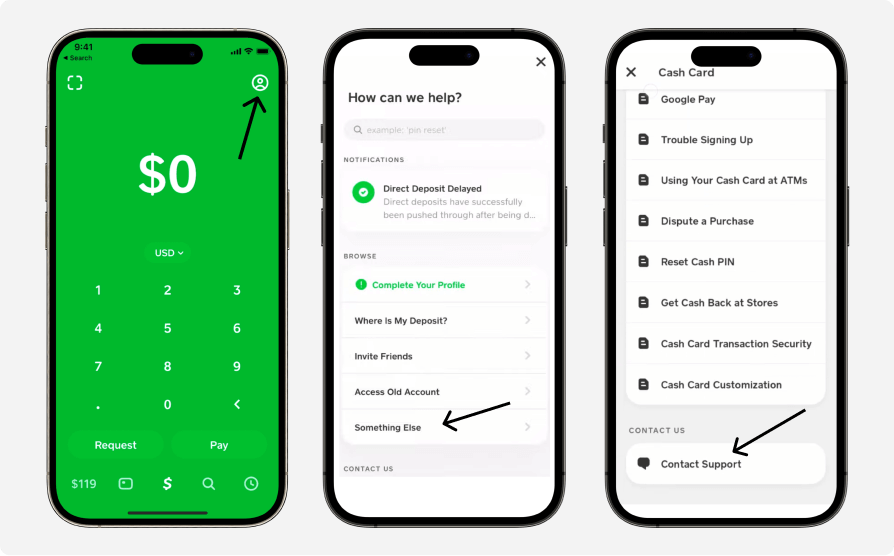
- Ask support to flag your account. Tap your profile icon → Support, explain that Paper Money is missing, and mention your location. Support cannot always force it, but requests get the account reviewed.
Anything beyond this, like changing your phone’s location to trick the rollout, violates Cash App’s terms and can get an account frozen. It is not worth it for a deposit feature.
How do you deposit paper money into Cash App?
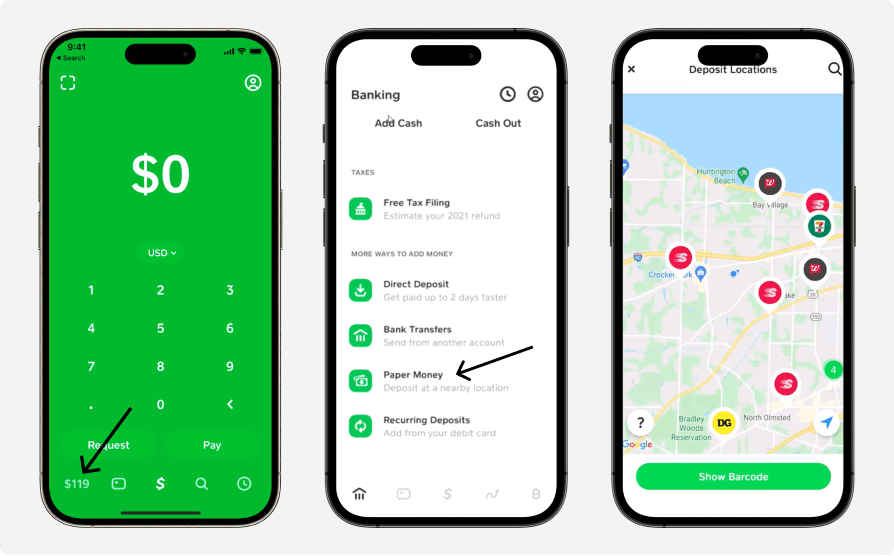
- Open Cash App and go to the Money tab.
- Tap Paper Money. A map shows the partner stores near you.
- Walk into the store and tap Show Barcode at the register, not before, because the barcode expires after a short time.
- The cashier scans the barcode and takes your cash.
- The deposit, minus the $1 fee, appears in your balance within minutes, with a notification.
What are the paper money limits and fees?
| Rule | Amount |
|---|---|
| Per deposit | $5 minimum, $500 maximum |
| Per rolling 7 days | $5,000 |
| Per rolling 30 days | $10,000 |
| Under-18 (sponsored) accounts | $250 per 7 days, $1,000 per 30 days |
| Fee | $1 flat per deposit, waived with Green status |
The fee and caps match Cash App’s official paper money page, and they sit alongside your other account limits, covered in our guide to Cash App limits. If a deposit is declined at the register, you have usually hit a rolling window; the app’s Limits screen shows your exact remaining room.
Where can you deposit paper money?
Cash App’s partner chains include Walmart, Walgreens, 7-Eleven, Dollar General, Family Dollar, Speedway, GoMart, Kum & Go, KwikTrip, and Thorntons. Coverage varies by location, so trust the in-app map over any list: it shows the stores that actually accept deposits near you. For other ways to fund your account, see adding money to your Cash App card.
Can you withdraw paper money from Cash App?
No. The paper money option only accepts deposits. To turn your balance back into cash, use your Cash App Card at an ATM ($2.50 fee, waived in-network with Green status), get cash back at a partner store register, or transfer to your bank, all covered in our guide to withdrawing money from Cash App.
Key takeaways
- The paper money option deposits $5 to $500 in cash per visit at partner stores, for a flat $1 fee (waived with Green status).
- Rolling limits are $5,000 per 7 days and $10,000 per 30 days; under-18 accounts get $250 and $1,000.
- The feature only appears on verified accounts; verification is the fix for most “missing option” cases.
- Show the barcode only at the register; it expires quickly.
- Deposits are one-way; cash comes back out through the Cash Card, ATMs, or a bank transfer.
For the full picture of what your account can do, see our guide to how Cash App works.





