


There is no direct way to transfer money from Venmo to Cash App: the apps do not connect, so the money has to cross on something both apps share. Two routes work reliably: a bank account linked to both apps (free, 1 to 3 business days) or a debit card linked to both apps (minutes, with a 1.75% Venmo instant-transfer fee). A third trick, pasting Cash App’s account numbers into Venmo as a “bank,” sometimes works but is not supported and can get flagged. Here is each route, step by step.
Method 1: How do you transfer through a shared bank account? (free)
This is the reliable route, and the only free one. Both apps must have the same bank account linked.
Step 1: Cash out from Venmo to your bank.
- In Venmo, tap your balance, then choose Transfer.
- Enter the amount and pick Standard, which is free and takes 1 to 3 business days (Venmo’s transfer FAQ).
- Confirm. Venmo’s bank-transfer caps apply: $19,999.99 per rolling week for verified accounts, $999.99 for unverified, and $5,000 per individual transfer.
Step 2: Add the money to Cash App from the same bank.
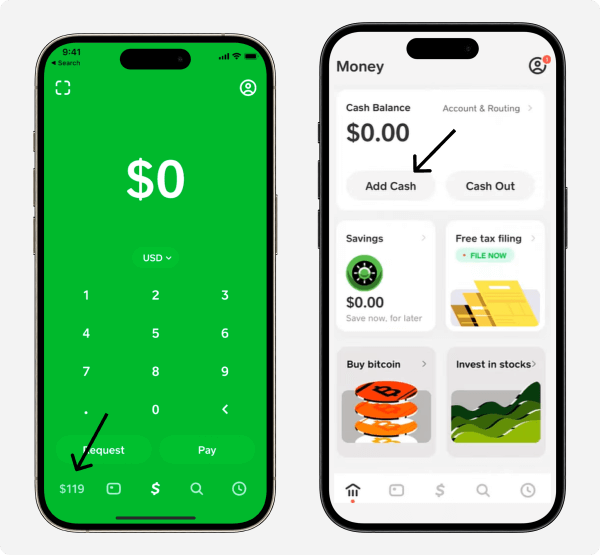
- In Cash App, open the Money tab.
- Tap Add Cash, enter the amount, and confirm with your PIN or Touch ID.
- The pull from your linked bank is usually instant. Add-cash limits vary by account and are shown on your Cash App limits screen in the app.
Total time is set by the Venmo leg: 1 to 3 business days, zero fees.
Method 2: How do you transfer instantly with a debit card? (fee)
If both apps have the same eligible Visa or Mastercard debit card linked, the whole move takes minutes.
- In Venmo, tap your balance, choose Transfer, and pick Instant with your debit card as the destination. The fee is 1.75% of the amount, minimum $0.25, maximum $25 (Venmo’s instant transfer FAQ), and the money typically lands within 30 minutes, capped at $5,000 per transfer.
- In Cash App, tap Add Cash and fund it from that same debit card. This side is free and instant.
Sending $100 costs $1.75 in fees; $1,430 or more hits the $25 fee cap, which makes larger transfers proportionally cheaper.
Does the Cash App account-number trick still work?
Sometimes, but treat it as unsupported. The idea: Cash App gives verified users a real account and routing number (through its partner banks) for direct deposits, and you can paste those numbers into Venmo → Settings → Payment Methods → Add a bank, then “cash out” from Venmo straight into your Cash App balance as if it were a bank.
Three honest caveats before you rely on it:
- Venmo does not officially support linking another payment app as a bank. Manual bank links verify by micro-deposits, and verification against a payment-app account can fail.
- Transfers can be flagged. Payment apps monitor for unusual account types, and a blocked transfer can sit in limbo longer than the 1-to-3-day bank route would have taken.
- It needs a verified Cash App account with direct deposit enabled; inbound deposits are capped at $25,000 each and $50,000 per 24 hours per Cash App’s terms.
If it works for your accounts, it saves nothing over Method 1 in fees (both are free) and only sometimes beats it on speed. Use it as a convenience, not a plan.
What are the fees and limits for each route?
| Route | Cost | Speed | Cap |
|---|---|---|---|
| Shared bank (standard) | Free | 1 to 3 business days | $19,999.99/wk out of Venmo ($999.99 unverified); $5,000 per transfer |
| Shared debit card (instant) | 1.75%, min $0.25, max $25 | Minutes to ~30 min | $5,000 per transfer |
| Account-number trick | Free | 1 to 3 business days, if it verifies | $25,000 per deposit into Cash App |
Venmo’s caps are rolling weekly windows, so a transaction counts against the limit for exactly one week. Cash App’s add-cash limit varies by account. The full picture for both apps is in our guides to Venmo limits and Cash App limits.
Key takeaways
- Venmo and Cash App do not connect; money crosses on a shared bank account or shared debit card.
- The bank route is free and takes 1 to 3 business days; the debit-card route lands in minutes for 1.75% (min $0.25, max $25).
- The Cash App account-number trick is unsupported: it can work, but verification failures and flagged transfers make it unreliable.
- Venmo caps bank transfers at $19,999.99 per rolling week (verified) with $5,000 per individual transfer.
- Going the other way is the same dance in reverse, covered in our guide to transferring from Cash App to Venmo.
For each app’s full mechanics, see how Venmo works and how to send money on Cash App.
For the full picture of what your account can do, see our guide to how Cash App works.





